 Bikube
Getting started
Introduction
What Bikube is, the ideas it is built on, and where to go next in the docs.
On this page
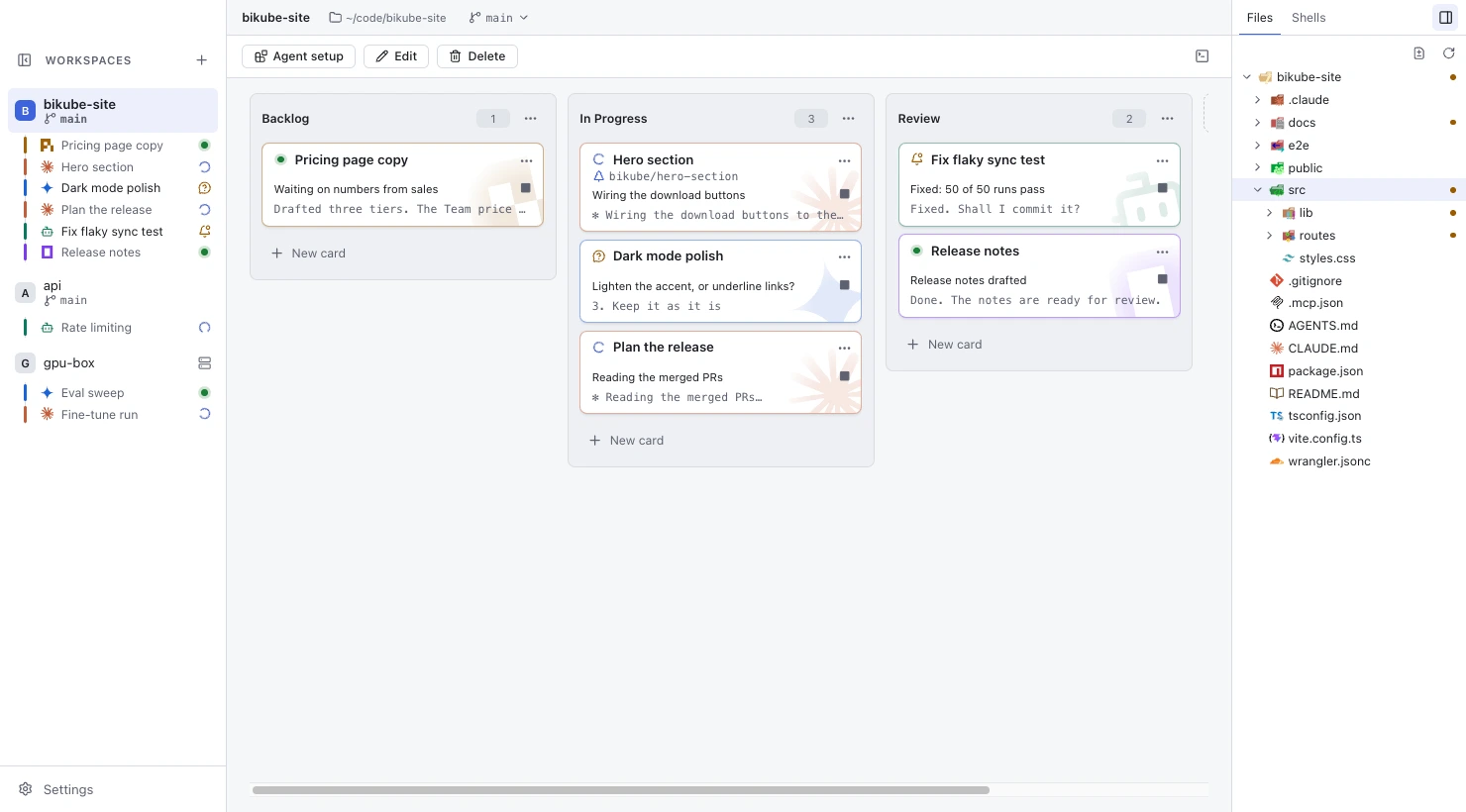
Bikube is a visual workspace for coding agents on macOS and Linux, built for Claude Code first: a kanban board where every card is a live terminal. You give each task its own card, start a coding agent in it (Claude Code, or Codex, Gemini CLI, OpenCode, Pi or a command of your own), and run many of them side by side. The board shows at a glance which agents are working, which are waiting for you and which have stopped, and the agents can update the board themselves.
Core ideas
Bikube is built on a handful of ideas. Each has its own page in these docs.
Workspaces
A workspace is a board for one project folder, usually one repository. It has a name, a working directory, its own columns and cards, and the agent its new cards start with. A workspace can also live on another machine: an SSH workspace runs its cards there through your own ssh. See Workspaces & columns.
Columns
Columns are the stages of the work on a workspace's board. A new workspace starts with Backlog, In Progress, Review and Done, and you can add, rename, reorder and delete them. A column's position says where a task stands; it never changes what runs in the card. Columns can also move cards for you when their agent starts working, waits for you or stops: see Automatic moves.
Cards
A card is one task, and a real login shell running an agent. Open it to work in its terminal at full size; on the board it shows its title, its status, what the agent says it is doing and the last line of output. Moving a card between columns never stops its process, and reopening a stopped card resumes the agent's conversation. See Cards and Agents & resume.
Shells
Not every terminal is a task. Each workspace has shells beside its board: a Default shell in the workspace folder, named shells such as a test watcher, and triggers that run a command in the background, such as a dev server or a build. See Shells & triggers.
Agents
An agent is the coding CLI a card starts. Bikube follows what each one is doing (Working, Waiting for you, Needs your answer), counts the cards waiting for you, notifies you, and takes you to the next one that needs you with one shortcut. Claude Code cards report all of this by themselves through hooks Bikube installs for them. See Activity & status.
The board command
Every card's shell has a board command on its PATH. Through it an agent (or you) can list the board, create cards in this or another workspace, move its own card, and report its status and activity. It is how agents drive the board. See The board command.
Where to go next
- Install: download Bikube for macOS or Linux and open it for the first time.
- Your first workspace: create a workspace and start your first card.
- The board command: let your agents read and change the board.
- Keyboard shortcuts: every default shortcut, for macOS and Linux.
Bikube is open source. To build it yourself, follow the app's README.
Checked against Bikube 0.9.1