 Bikube
Agents
The board command
Every subcommand of the board command that agents and you can run inside a card, with its syntax and an example.
On this page
Inside a card, the board command lets the agent (or you) read and change the board: list workspaces and cards, create cards in this or another workspace, rename, move and describe cards, and report what the agent is doing. It is how agents drive Bikube. This page lists every subcommand with its syntax and an example.
Where it works
board is on the PATH of every card's shell, and of its extra panes, so there is nothing to install. It isn't a global command: outside a Bikube card it isn't on the PATH, and run there by its full path it answers board: not running inside a Bikube card.
It talks to the running Bikube over a socket that only your user can use, and it works only from a card whose shell is running. If Bikube has quit, it answers board: Bikube is not running.
When PATH is reordered: $BIKUBE_BIN
Every card's shell also has $BIKUBE_BIN, the folder that holds board. If a shell profile reorders PATH, as macOS's path_helper does in a login shell, call it through that variable and it works whatever PATH says:
"$BIKUBE_BIN/board" listThis is how Bikube's own Claude Code hooks and instructions call it. Use the same form in scripts and agent instructions.
Name cards, columns and workspaces
| Argument | How it is resolved |
|---|---|
. | The card the command runs in. |
| A card's id | That card, in any workspace (on rename, move, status, description and describe). |
| A card's title | A card with exactly that title (case-sensitive) in this card's workspace, or in the one --workspace names. Two cards with the same title are refused; use the id. |
| A column's title | A column of that name in the workspace, in any case. |
--workspace | A workspace's id, or its name in any case. Without it, this card's workspace. |
--workspace works on list, create, rename, move, status, description and describe. Card ids and workspace ids come from board list and board workspaces. Options can go anywhere among the arguments, each at most once; -- ends the options, for a title that starts with --.
Read the board
board workspaces
Lists every workspace in sidebar order: its id, name, local or ssh <host>, and folder. A * marks this card's workspace.
board workspaces5f0c2b1e-8d3a-4c7e-9b2f-1a6d4e8c3b70 web local /Users/me/code/web *
9a7e4d21-3b6c-4f80-a1d2-7c5e9b0f4a13 api local /Users/me/code/api
c3d8e6f4-2a1b-4e9c-8f7d-5b0a3c6e1d92 gpu-box ssh me@gpu-box ~/trainboard list
Shows a workspace's columns in order and each column's cards top to bottom, with each card's id and state: running or stopped, its activity, its worktree branch, this card for the caller, · description when it has one, and its agent status on the next line.
board list
board list --workspace api
web (/Users/me/code/web)
Backlog (1)
Write the changelog [2b4f8a10-6c3d-4e2b-9f71-0d5a8c3e6b14] stopped · description
In Progress (1)
Fix the login redirect [7c1e9d42-5a8b-4f3c-b6e0-2d9f1a7c4e85] running, working, branch bikube/fix-the-login-redirect, this card
status: Reproduced the bug, writing a testBoth workspaces and list take --json for output a program can read. An agent reading the board before it creates cards should use it:
board list --jsonCreate cards
board create [--agent <agent>] [--description-file <file>|-]
             [--worktree [--branch <name>]] <column> <title>
board create adds a card at the bottom of a column and prints its id and its workspace's name. The card is not started: it runs nothing until someone opens it.
board create Backlog "Write the changelog"2b4f8a10-6c3d-4e2b-9f71-0d5a8c3e6b14 web| Option | What it does |
|---|---|
--agent <agent> | The new card's agent: claude, codex, gemini, opencode or pi. Without it, the card gets this card's agent, or the target workspace's default when this card runs a custom command. |
--description-file <file> | The new card's description, read from a file; - reads standard input. An empty file gives no description. |
--worktree | The new card gets its own git worktree when it is first opened (see Pending worktrees). Local workspaces in a git repository only. |
--branch <name> | With --worktree: the worktree's new branch. Without it, one named from the title (bikube/<title>). |
--workspace <workspace> | Creates the card in another workspace (see below). |
An agent can hand over a task in one step, writing the description to standard input:
cat <<'EOF' | board create --agent codex --description-file - --worktree Backlog "Add rate limiting"
Add rate limiting to the public API: 100 requests a minute per token.
Return 429 with a Retry-After header. Add tests.
EOF
board create in another workspace
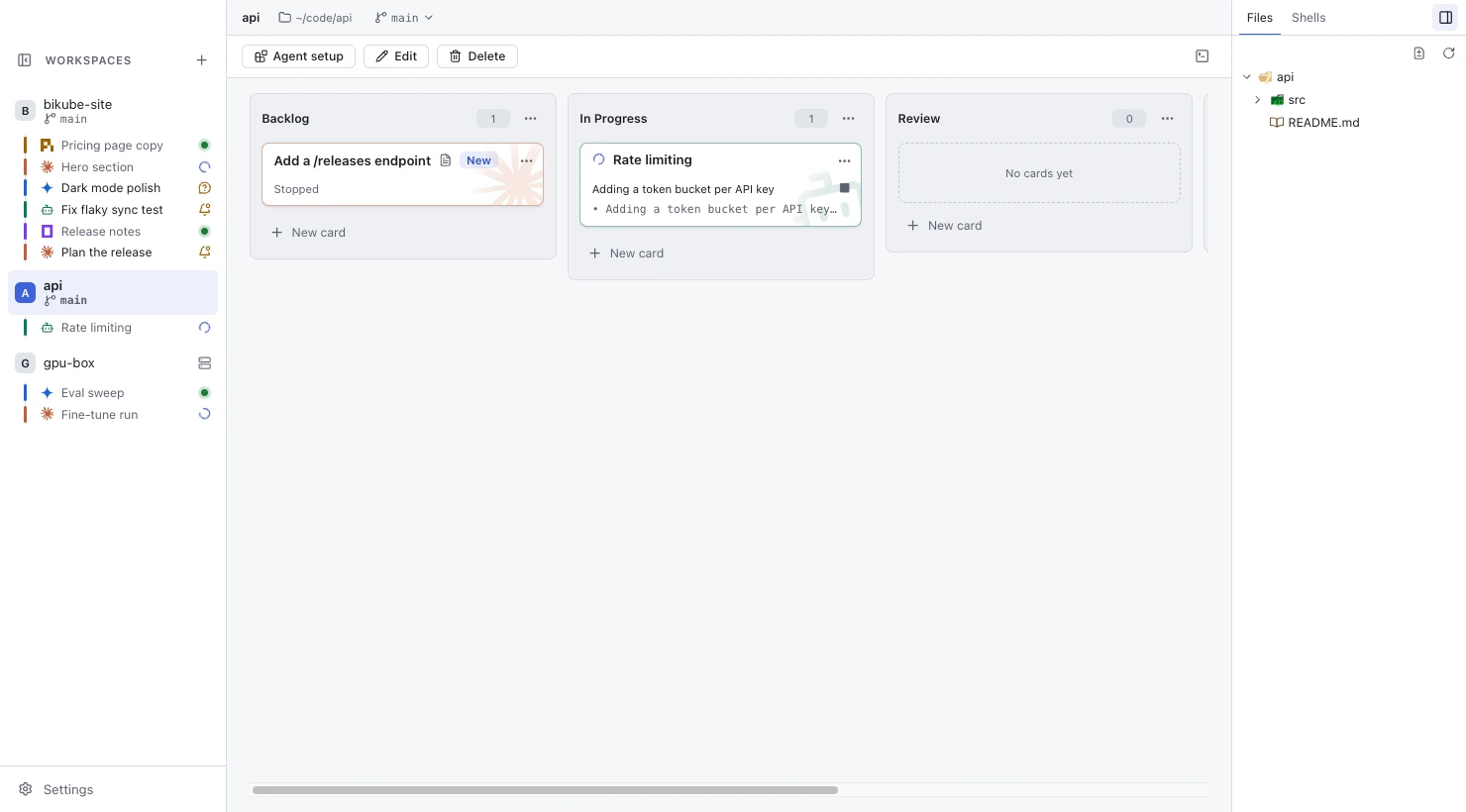
With --workspace, board create adds the card to another workspace's board: the column and title are resolved there. This lets an agent working in one repository create a task for another, for example a backend change a frontend task needs. Ask your agent to "create a card for this in the api workspace", and with Bikube's instructions a Claude Code card runs board workspaces, then writes the task and creates it:
board workspaces
board create --workspace api --description-file - Backlog "Add a /releases endpoint" < task.md
A card created from another workspace shows the New mark until it is first opened on any machine, so you notice it arrived; see Cards. Cards created in the calling workspace get none.
Pending worktrees
board create --worktree doesn't make the worktree at once. It checks that the target workspace is local and in a git repository and that the branch is a valid name that doesn't exist yet, then creates the card with a pending worktree: it shows Worktree on first open and runs nothing.
The first time anyone opens the card, on any machine, Bikube makes the worktree (as Move to own worktree… does), runs the workspace's Worktree setup if it has one, and starts the agent there in a new session. If git fails, the card stays pending and its view offers Retry and Run in workspace folder (which drops the worktree). Since the pending worktree is saved and synced, only the machine that opens it first touches git. See Worktrees & git.
Change cards
board rename
Renames a card. The title is cleaned to one line.
board rename . "Fix the login redirect on Safari"board move
Moves a card to the bottom of a column of its own workspace. A card is never moved to another workspace; moving it to the column it is in changes nothing. Moving never stops the card's process.
board move . Review
board move 7c1e9d42-5a8b-4f3c-b6e0-2d9f1a7c4e85 Done
Describe cards
board description prints a card's description followed by a newline, or nothing when it has none. board describe replaces it with a file's text, or standard input for -; an empty file removes it. A description holds at most 100,000 characters.
board description .
board describe . notes/task.md
echo "Also update the docs." | board describe "Write the changelog" -
When a card with a description starts its agent fresh, the agent is asked to read it with board description .; see Card descriptions.
Report progress
These set what the board shows about a running card; on a stopped card they answer board: "<title>" is not running.
board status
Sets the card's agent status, a short line shown under its title (at most 200 characters, on one line). An empty text clears it.
board status . "Running the test suite"
board status . ""
board activity
Sets the card's activity: working, waiting (for you) or question (it needs your answer); none clears it. The board shows it as an icon (Working, Waiting for you, Needs your answer), and waiting cards are counted and notified. See Activity & status.
board activity . working
board activity . question
board activity . none
activity acts only on cards of this card's workspace. Claude Code cards set their status and activity by themselves through Bikube's hooks; other agents can call these from their own hooks or instructions.
Commands Bikube runs for you
Bikube's Claude Code hooks use two more subcommands. You don't need them, but they are there:
board session <card> <session-id>sets the Claude Code conversation the card resumes. The hooks run it when you send a message and after a/resume. It is listed inboard help.board usage <card> <transcript>reads a Claude Code transcript file and reports the card's context and token usage for its context bar. It isn't listed inboard help.
A worktree card's setup line also reports its result with board setup . ok or board setup . failed.
Help and errors
board help (or board alone, or board --help) prints every subcommand with its options and exits with 0.
board helpA wrong number of arguments or an unknown option prints the same usage to standard error and exits with 2. A command the board refuses prints why, starting with board:, and exits with 1, for example:
board: no column "QA"; columns are: Backlog, In Progress, Review, Done
board: 2 cards are titled "Fix tests"; use the card id
board: no workspace named apii
In SSH cards
Cards of an SSH workspace have board too: a small script Bikube writes on the host for each session, which reaches Bikube through a socket your own ssh forwards. It needs perl or python3 on the host, and it is removed when the session ends.
It serves only its own card's workspace, so it takes fewer commands:
board move <card> <column>
board status <card> <text>
board activity <card> working|waiting|question|none
board session <card> <session-id>
board description .
There is no workspaces, list, create, rename, describe, usage or --workspace, and description reads only its own card's. When the host refuses the forward, board answers board: can't reach Bikube from this host while the card itself keeps running; without perl or python3 it answers board: needs perl or python3 on this host.
Checked against Bikube 0.9.1