 Bikube
Agents
Agent setup
What the Agent setup page shows about a workspace's Claude Code configuration and what it can change.
On this page
A workspace's Claude Code setup is spread over many files: the project's .claude/ folder, CLAUDE.md and .mcp.json, your own ~/.claude/ and ~/.claude.json, installed plugins, and Bikube's own hooks. The Agent setup page gathers all of it for one workspace in one place, shows where each entry comes from, warns about broken files, and lets you turn plugins and MCP servers on or off for the workspace. This page explains what it shows and what you can change there.
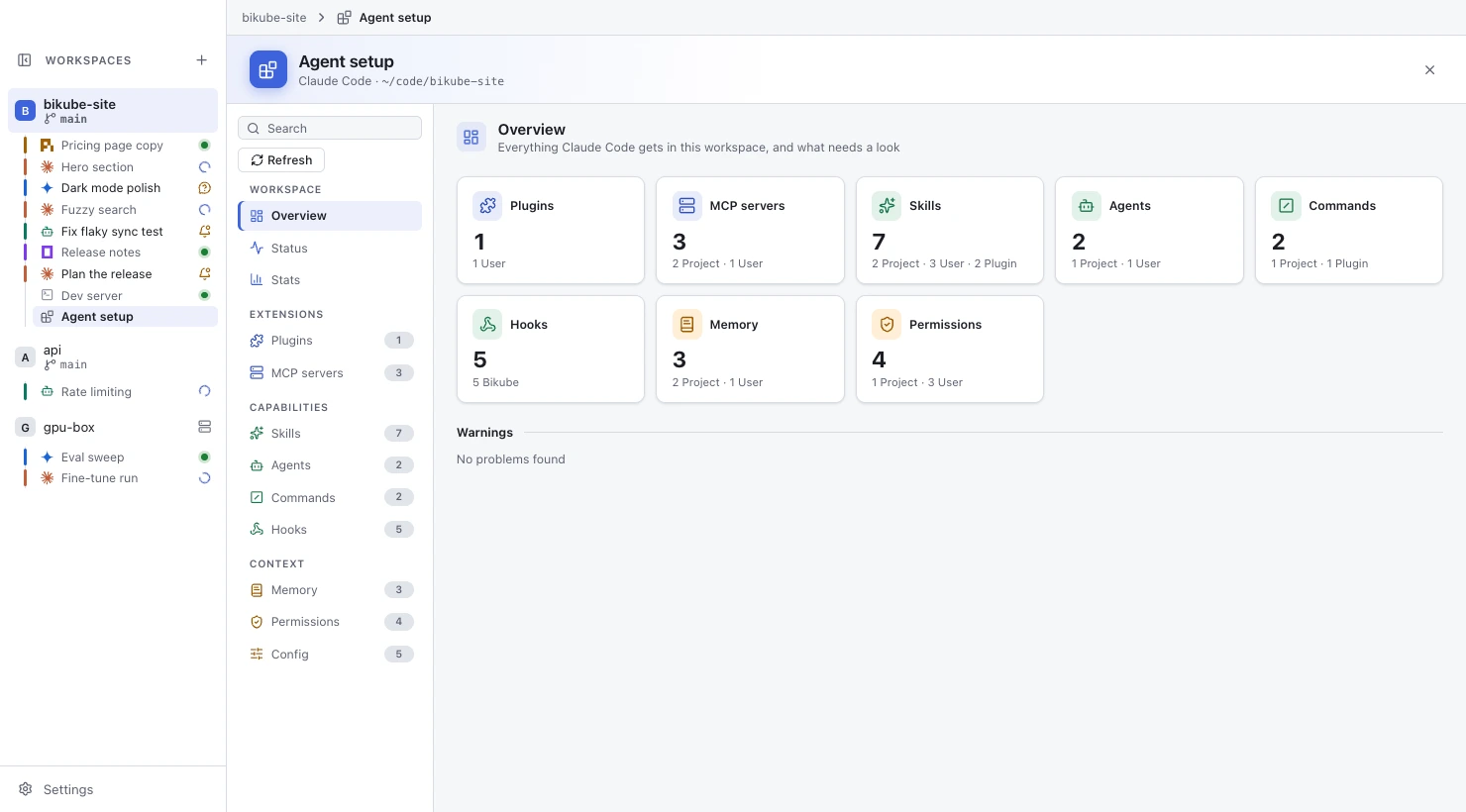
Open the page
- Click Agent setup at the start of the toolbar above the workspace's board.
- Or pick Agent setup in the command palette.
The page fills the main area, like an open card. The title bar reads the workspace's name, then Agent setup, and the sidebar lists an Agent setup row under the workspace for as long as the page is open. Back (⇧⌘B / Ctrl+Shift+B, or the workspace's name in the title bar) shows the board and keeps the row; click the row to come back. The × at the end of the page's header (Close Agent setup), or ⌘W / Ctrl+Shift+W or ⇧⌘W / Ctrl+Shift+Q, closes it and removes the row. The page is never saved: after a restart every workspace shows its board.
The page is about Claude Code only: its header reads Agent setup with Claude Code · <workspace folder> under it. For an SSH workspace it shows only Agent setup isn't available for SSH workspaces yet. It isn't available in card windows.
What it reads
For the workspace's folder and your home folder, the page reads:
- Project:
.claude/settings.json,.claude/settings.local.json,.mcp.json, and the skills, agents and commands under.claude/. - User:
~/.claude/settings.json,~/.claude.json, and your skills, agents and commands under~/.claude/. - Plugins: the plugins installed in Claude Code (from
~/.claude/plugins/) and what each provides. - Bikube: the hooks of the settings file Bikube gives every Claude Code card (read-only).
- Memory: the
CLAUDE.mdfiles Claude Code loads for the folder.
Every entry carries a source chip: Project, Local (settings.local.json, or the folder's entry in ~/.claude.json), User, Plugin with the plugin's name, or Bikube. Managed (enterprise) settings aren't read. Nothing is ever run: no hook, no MCP server, nothing a file names.
Sections
A list on the left groups the page's sections. Each shows its number of entries and a dot when one of them has a warning.
| Group | Section | What it shows |
|---|---|---|
| Workspace | Overview | One card per section with its count split by source (such as 3 Project · 8 User · 4 Plugin; click a part to see just those), then every Warning on the page, or No problems found. |
| Status | Claude Code's version and path (or Not installed), the signed-in account, the model and output style in effect, each settings file (Found, Missing or Invalid), and Bikube hooks: active in Claude Code cards, with Bikube's Claude Code status setting. | |
| Stats | The workspace's Claude Code sessions over the last 30 days, including its worktree cards' folders: tokens and sessions per day, tokens by model, and the most used tools, skills and subagents. No cost is estimated. | |
| Extensions | Plugins | Each installed plugin with its version, description, author and what it provides, with an on/off switch for this workspace; then the known marketplaces. |
| MCP servers | Each server with its type (stdio, http or sse), its command or URL, and its source. Environment variable and header values are never shown, only their names. | |
| Capabilities | Skills, Agents, Commands | Each skill, subagent and slash command with its description and source; a subagent's model and tools. |
| Hooks | Every hook by event, with its matcher, command and source, Bikube's own included. | |
| Context | Memory | The CLAUDE.md and CLAUDE.local.md files Claude Code loads, in load order, with the files they import. |
| Permissions | The default mode and the Allow, Ask and Deny rules, each with its source, and additional directories (read-only). | |
| Sandbox | Claude Code's Bash sandbox settings: whether it is enabled, and the allowed and denied domains and the write and read rules, each with its source (read-only). | |
| Config | Every other settings key: its value in effect, the file it comes from, and the files it overrides; then your preferences from ~/.claude.json (read-only). |
Where several files set the same value, the page follows Claude Code's order: settings.local.json wins over the project's settings.json, which wins over yours. Hooks and permission rules from every file apply together.
Warnings
The page warns, with an amber ⚠ on the entry, in its section's dot and in Overview's Warnings, about: a JSON file that doesn't parse, a file too large to read (over 1 MB), a plugin whose install folder is missing, a skill or agent without frontmatter or without a name or description, a skill, agent or command whose frontmatter doesn't parse (Invalid frontmatter), an imported memory file that doesn't exist, and a hook whose command file doesn't exist.
Find things
- The Search box above the section list filters the rows of every section by name, description, command, URL, key or source. Every word must match. Esc clears it.
- The source filter at the top of a section (All, Project, Local, User, Bikube, Plugin) narrows every section to one source; Plugin opens a menu of your plugins.
- Long groups (hook events, permission lists, plugins and marketplaces, settings and preferences) fold under headings that show their counts.
The section shown, the search, the filter and the folded groups are remembered per workspace until you quit. The page reads its files again every few seconds while it is in front, when you come back to Bikube, and on Refresh. Stats and Claude Code's version are read only when shown and on Refresh.
What you can change
Changes are written only to the workspace's .claude/settings.local.json, so they apply to this workspace and win over the project's and your own settings. Every other key in that file is kept as it is.
- Plugins: turn an installed plugin on or off for this workspace. Its skills, agents, commands and hooks show dimmed (Plugin off) while it is off.
- MCP servers: turn a project server (from
.mcp.json) on or off. One you haven't approved yet readsNot approved yet; Claude Code asks about it at its next start. User and local servers readEnabled, and a plugin's servers follow their plugin. - Config: change a setting whose value is on or off (a switch) or a number. A value set in
settings.local.jsonalso has Reset, which removes it from that file. Text, lists and objects are read-only.
After a change the page says Changes apply to Claude Code sessions started from now on: running Claude Code cards keep their settings until they restart. If settings.local.json isn't valid JSON, nothing is written and the page says so.
Every entry backed by a file has Open file, which opens it with the app set under Editor in Settings, and Reveal, which shows it in Finder or your file manager.
Checked against Bikube 0.9.1